Sunday, 1 April 2012

Now SMS from Gmail FREE (Available to India Now)

Gmail SMS

Send free SMS to your friends from Gmail.

How it works

  • From Gmail, click on Settings, and go to the Labs tab
  • Scroll down until you see “Text Messaging (SMS) in Chat” and select Enable
  • Also enable the “SMS in Chat gadget” and then Save Changes
  • You can send free texts to your friends in the US and many countries around the world

How to send a SMS from Gmail

Log into your Gmail account. In theSend SMS box above Chat, enter the phone number you want to send a SMS to.


In the dialog box, enter Contact name of the SMS recipient and check that country and phone number are correct. Then, clickSave. 
Type your message in the chat window and hit Enter. 

If your contact replies, the text message response will appear as a reply in Chat. These conversations are stored in your Chat history just like regular chats.Learn more about Gmail SMS.

10 Best New Google Android apps for FUN and WORK

Google’s Android Market is cooking:Google says there are 250 million Android devices in use and that 11 billion apps have been downloaded, including 1 billion over the past month. The latest wave of Android apps for smartphones and tablets address everything from remote PC access to encyclopedias to silly ratings.
AppZilla! 40 Apps in 1!
Previously available just for the iPhone, you now can get Appzilla for Android, which includes a police scanner, area code lookup, battery life monitor, crystal ball, coin flip and LED flashlight apps, among others.

Price: 99 cents
Official Wikipedia App for AndroidAlthough you might run into the occasional anti-SOPA blackout day, Wikipedia is making its online encyclopedia available to Android users with this app featuring access to 20 million articles in 280 languages. Features include being able to save articles to read later or offline. There are other Wikipedia apps on the Android Market, but this is the official official official one.
Price: Free
Airbnb AirbnbAirbnb Airbnb, which lets you find unique accommodations in 19,000-plus countries and 190-plus countries as well as rent out your own property, has expanded its app beyond the iPhone to Android devices. The app, which includes lots of photos of potential homes and apartments made available to the “trusted community” of Airbnb, lets you reserve and pay for accommodations from your mobile device and monitor guest check-in/check-out for your property. Price: Free
 
Dragon Go! From NuanceThis simple yet sophisticated voice search app comes from one of the recognized leaders in voice technologies. You can use it to conduct basic searches, such as for a local pizza joint, or to interact with dozens of popular websites such as YouTube and ESPN. Android blog Appolicious found Dragon Go! very fast when used on a Motorola Droid X.  
Price: Free

Splashtop Remote DesktopThis app, now at Version 1.6.5.6, gives you remote access to your desktop and laptop files from your smartphone and some Android tablets, such as the Kindle Fire and Nook Color and Nook Tablet. Splashtop can be used to stream high quality video and audio from your computer to your mobile device as well. An HD version is also available for tablets running Android 3.X and higher.
Price: $4.99
 
Facebook Timeline Covers:
D33P, from JoyAether Now that Facebook has foisted its Timeline technology on users of the social network, it’s time to get fancy about it. This app helps you combine cover art for the timeline with your profile picture. 
Price: Free (for limited time)
UpNext HD MapsThis touchscreen-enabled and tablet-oriented app offers fluid 3D maps of 50+ U.S. cities that you might be exploring to shop, eat or bop around. You can also use the app to search out deals and sync up with Verizon’s VZ Navigator GPS offering. 
Price: Free
Jotly, from FirespotterJotly celebrates the oversharing lifestyle enabled by the combination of social networks and mobile devices with this app for rating everything you come across. “Search for nearby items. Even if it's a piece of lint, it might be really awesome. Jotly will help you find it. Find the best and worst things at any place. Like ducks? Jotly will show you big and little ducks.” Oh, and the app has a rating of “Low Maturity.”
Price: Free
 JunoWalletThis mobile wallet lets you get store gift cards on your smartphone, give gift cards and early credits toward new gift cards. The app is now on Version 7.2.6 but is gaining popularity, so figured it was worth highlighting.
Price: Free
Activision’s Call of Duty: ELITEThis companion app to the popular game lets you “evaluate your multiplayer progress with in-depth stat analysis. Formulate new strategies based on your recent performance and remotely incorporate edits to your loadouts. Push your changes directly into Call of Duty: Modern Warfare 3 so you’re always ready to play.”
Price: Free

15 Best Windows 8 apps to get you started

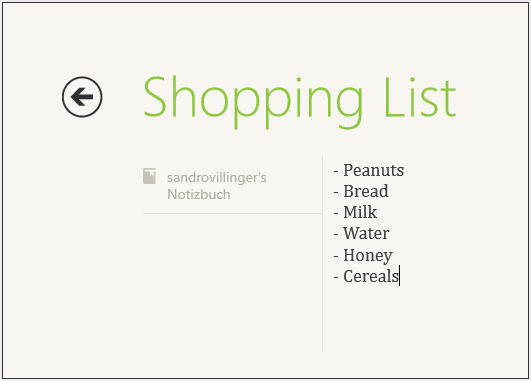
Evernote
Evernote looks nothing like the desktop "Windows 7" app, but rather a built-from-scratch and completely redesigned tile. It works as expected: You create notes, you read notes, you sync notes.

What I don't get, however, is that Evernote doesn't offer a Preview tab that shows notes, but rather just small icons. I'd bet that this gets corrected soon.


Video app
A built-in app, but impressive nonetheless: Microsofts "Video" app ties in with the Zune video store. The marketplace offers several hundred movie downloads and rentals it's no iTunes yet, but the prices can't be beat. Several very recent movies go for 280 to 420 Microsoft points (oh yeah, did I mention you need to pay with Microsoft points? Yuck!) both in HD and SD. Only a handful of older movies ("Forrest Gump," for example) are priced higher than that.
The app itself is beautifully designed. Simple and elegant. Click on a movie poster and you can easily buy or rent a movie.


Cook Book
Amateur chefs, here's one for you: The Cook Book app sports more than 200,000 recipes from the Big Oven service. You can select from a variety recipes and get detailed lists of ingredients, instructions and user reviews.


Kayak
Here's another service that greatly benefits from being an app, instead of a (mostly) ad-cluttered website with information overflow. The Kayak app is simple and does what it's there to do: Find the best hotels. You'll get reviews, directions (using Bing Maps, what else) and photos for most hotels in the world.

Vimeo
What? No YouTube? Not a problem: Vimeo offers mostly higher-quality videos and is not nearly as littered with stupid clips. The vimeo app is probably one of the most beautiful apps out there and sports a very -- dare I repeat it -- "fast and fluid" experience. And yeah, it's really fast and fluid.


Dictionary
Use the Dictionary.com app for pretty much anything you'd use a dictionary for except maybe an impromptu booster seat or DIY flower press.

WordPress
Popular blogging platform WordPress has a nice little app on the Windows Store. It displays all blogs very elegantly, and allows you to browse for topics and share links, pictures and quotes from any app. Say, for example, you've created a neat little image using Ashampoo ImageFX (No. 8). Just bring up the Charms menu and select Share, WordPress. That'll copy the picture to WordPress and onto your blog. This concept works with many apps on the store.


Ashampoo ImageFX
This one's more playful than useful. ImageFX lets you apply tons of cute effects and filters on your images both local and on SkyDrive. You can share it with any other app that allows the Share charm.

Lyrics
MusicMatch has a neat little app for all you music lovers out there. Lyrics lets you browse for lyrics online, but also accesses your library and displays lyrics. This is one great example of where the "side-by-side" view of apps really shines: On the left I have the built-in "Music" app playing "Shiny Happy People" by REM, on the right sits Lyrics gives me the song text.

USA Today
The news rarely looks this nice. The USA Today app is a prime example of how reading on a tablet really works. It's the full-blown online version of USA Today, tightly packed into an easily readable app and the preview tile works great.


Physamajig
A cool game that lets you draw landscapes on-screen, animate objects and run simulations. Here's a neat little demo from the developer.

Pinball FX 2
A full-fledged pinball game, Pinball FX 2 is one of the Windows 8 app store's more graphically impressive games. Most of the pinball tables are well made and show a lot of attention to detail.


PhotoVault
The app for photo lovers. PhotoVault delivers the most beautiful photos from all around the world. Zebras in the savanna? You got it. World Cup shots? Oh yes!


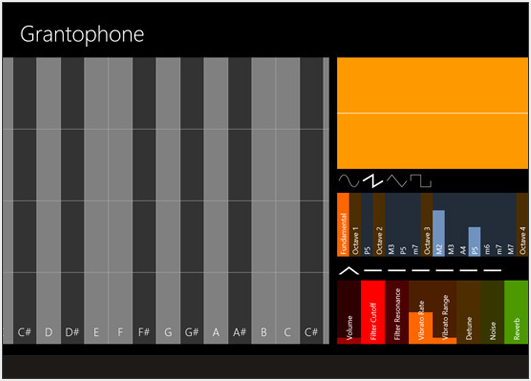
Grantophone
Play a musical instrument with your Windows 8 PC. You can customize all instruments to create funky techno music or quiet classical pieces.

Carmen Sandiego
Here's one for the youngsters: Carmen Sandiego is a math-based puzzle adventure game, and while it's labeled "educational," it makes math a lot of fun.


SkyDrive app
Are the Metro apps dumbed down? Maybe. Do the majority of users care? No. And that point brings us full-circle back to the discussion of Metro vs. Classic.
Most users go to a website or a desktop program for one specific purpose and rarely need advanced options. This is the Metro experience. It distills sometimes complex information and tasks down into a very clear and simple interface. It's what most users want. And even us techies sometimes love the simpler approach to things.


SkyDrive website
For example, compare the SkyDrive app (pictured) with the SkyDrive website (pictured).


The website may be more functional, but it's not accessible to the user and it's nowhere near as fast to use (even for pros), especially when you're on the go.
And this is where Microsoft might actually win (at least theoretically -- it still needs to achieve the numbers) against Google and Apple. The moment you need more options than the Metro apps offer, you go back to the classic desktop and it's all right there. After being skeptical at first, I think this is where Redmond might get it right, bringing both worlds together in a way that doesn't feel like a compromise.

Monday, 26 March 2012

மின்னஞ்சல்களை சேமித்திட உதவிடும் மென்பொருள்

எமக்கு வரும் முக்கிய மின்னஞ்சல்களை கணினியில் பாதுகாப்பாகச் சேமித்திட உதவிடும் மென்பொருள்

பொதுவாக இணைய வசதி உள்ள கணினியிலேயே மின்னஞ்சலைப்பயன் படுத்திட முடியும் இணைய வசதி இல்லாத சந்தப்பங்களிலோ அல்லது வேறு தேவைகளுக்காகவோ இவ்வாறான தேவைகள் ஏற்படலாம்.

இந்த மென்பொருளின் பெயர்தான் Zimbra Desktop என்பதாகும். இந்த 92 MB அளவுடைய மென்பொருளை Download செய்து நிறுவிக்கொள்வதன் மூலம் உங்கள் கணினியில் இணையம் இல்லாதபோதும் கூட நீங்கள் முதலில் இணையத்திலிருந்து சேமித்த மினஞ்சல்களை படிக்கலாம்.


இதன் எத்தற்காக எவ்வாறு பயன்படுத்துவதெனில் NetBrowsing Center இற்குச்சென்று குறைந்த நேரத்தில் மின்னஞ்சல் களை Pendrive இனுள் சேமித்து வீட்டில் பயன்படுத்தலாம். 


முக்கிய மின்னஞ்சல்களை Backup ஆக சேமித்துக்கொள்ளலாம்.

RFID தொழில்நுட்பம்

RFID தகவல் தொடர்பாடல் ஒரு பார்வை


RFID என்ற தொழில்நுட்பம் பற்றி பார்க்கலாம். Radio Frequency Identification என்பதன் சுருக்கமே ஆகும்.  இது ஒரு அடையாளம் அறியும் நுட்பமாகும்.

RFID இனுடைய அடிப்படைச்சுருக்கம்
தமிழில், வானொலி அதிர்வெண் அடையாளம் என்றைழைக்கப்படும் நுட்பம் (கருவி) தனக்கு கொடுக்கப்பட்டுள்ள Programe இற்கு ஏற்ப கேள்விகளை தொடர்ச்சியாக அல்லது குறித்த கால இடைவெளியில் வானொலி அலை ஊடாக அனுப்ப கூடியதாகும்.

உதாரணமாக நீங்கள் உங்கள் வீட்டிலிருந்து வெளியே செல்லும் போது இரண்டு நிமிடங்களுக்கு ஒருதடவை வானொலி அலைகளை வெளியிடுமாறு அமைத்தால் உங்கள் வீட்டில் இருக்கும் அலைவரிசையை வாங்கும் கருவியின் மூலம் (Receiver) பெற்றுக்கொண்ட அலையிலிருந்து நீங்கள் எவளவு தூரத்தில் உள்ளீர்கள் எவளவு  வேகத்தில் பயணிக்கிறீர்கள் எந்த திசையில் பயணிக்கிறீர்கள் போன்ற தகவல்களை அறியலாம். இக்கருவிகள் SIM Card களை விட சிறிய அளவிலே கிடைக்கின்றன.

இத் தொழில்நுட்பமானது 1948 இலே கண்டுபிடுக்கப்பட்டலும் பெரும்பாலும் பாவனைக்கு 1980  களிலெயே வந்தது. RFID முதல் முறையாக இரண்டாம் உலகப்போர் நடைபெறும் காலத்திலேயே British radar system தினால் German aircraft இன் அணுகுதல்களை இரகசியமாய் அறிவதற்கு பயன்படுத்தப்பட்டது. இன்றய காலப்பகுதியில் இத் தொழில்நுட்பம் மேலும் பல வளர்ச்சிகண்டுள்ளது.

RFID எவ்வாறு வேலை செய்கிறது?
இதனுடைய அடிப்படையாக தகவலை அனுப்புதல் தகவலை பெறுதல் என இரு வேலைகள் தேவைப்படுகிறது.  இங்கு தகவலை அனுப்புவன Tag எனப்படுகின்றன தகவலை பெறுபவை Antena மற்றும் காட்சிப்படுத்தகூடிய கருவி (மென்பொருளாகவும் இருக்கலாம்) ஆகியவற்றுடன் காணப்படும். Radio Frequency  பயன்படுத்தப்படுவதால் தகவல் பரிமாற்றத்தின் போது மூன்றாமவரால் தகவல் திருடப்படாமல் இருப்பதற்காக இதற்கென தனியாக Communication Protocol, Communication Network என்பனவும் செய்நிரலாக்கத்திற்காக Database Data Synchronization உள்ளிணைந்து உள்ளது.
வானொலி அலைகள் முதலில் Electronic Product Code (EPC) இனை அடைகிறது இது  அனைத்துவகையான Tag களிலிருந்து வரும் அலைகளையும் அறியும் தன்மையுடையதாகும், வேறு தேவைகளுக்காக கணினியோடு இணைத்து மென்பொருட்களும் பயன்படுத்தப்படுகின்றன.

RFIDஇல் Tags எவ்வாறு வேலைசெய்கின்றன?
        பொதுவாக இவை இரண்டுவகைப்படுகின்றன.
  •                                   Passive Tags
  •                                   Active Tags
 Passive tags ஆனவை எல்லாநேரங்களிலும் Reciever உடன் தொடர்பில் இருக்காது. தேவை ஏற்படும் போது மாத்திரம் அல்லது நாம் பயன்படுத்தும் போது மட்டும் இயங்குகின்ற. இதற்கு உதாரணமாக வியாபார நிலையங்களில் விற்பனை பொருட்களில் உத்தரவாத அட்டைகளில் பயன்படுகின்றன. இவற்றிலும் இரண்டுவகைகள் உள்ளன Class0 என்பவை Send only மற்றயவை Class1 இவை Send/Write ஆகிய இரண்டையும் செய்கின்றன.

RFIDஇல் Readers எவ்வாறு வேலைசெய்கின்றன?
Reader ஆனது குறித்த தூர அளவில் வானொலி அலையூடாக tag இலிருந்து அனுப்பப்படும் தகவலை அறிகிறது இவ்வேளை  ஒரே அலைஎண்ணையுடைய இரு tags காணப்பட்டாலும் தனக்குரியதுடன் மாத்திரம் தொடர்பை பேணுவதர்காகவே இங்கு தனித்தனியான Protocol பயன்படுத்தப்படுகிறது.
எதிர்காலத்தில் இத்தொழில்நுட்பம் எவ்வாறு இருக்கும் என பார்த்தால்.. வியாபாரப் பொருட்களில் பயன்படுத்தப்படும் பார்கோட் இற்கு பதிலா இது அதிகம் பயன்படுத்தப்பட்டுவருகிறது. மேலும் இது எதிர்காலத்தில் கண்காணிப்பு மற்றும் தொடர்பதிவுகளை மேற்கொள்ளும் துறைகளில்  இதன் ஆதிக்கம் அதிகரிக்கும் எனலாம்.

RFID எவற்றில் அதிகம் பயன்படுகிறது?
  • சிறைச்சாலையில் உள்ள கைதிகளின் கைகளில் இதை பொருத்திவிட்டால் அவர்கள் தப்பிவிடாதவாறு பார்க்கமுடியும்
  • விமானங்களின் Passport இல் பொருத்தப்பட்டுள்ளதால் அவர்களையும் அவதானிக்க முடியும்.

  • இரத்தவங்கிகளில் வேகமாக என்னவகை இரத்தம் இருப்பில் உள்ளது என்னவகை இரத்தம் தேவை என தீர்க்கமான முடிவுகளை வேகமாக எடுப்பதற்கு பயன்படுகிறது.

உலகின் அதிவேக சூப்பர் கம்ப்யூட்டர்


ஜப்பானின் ஃபிஜிட்சு நிறுவனம் சமீபத்தில் K computer என்ற புதிய சூப்பர் கம்ப்யூட்டர் வடிவமைத்து வெளியிட்டுள்ளது.இதுதான் இப்போது உலகின் அதிவேக சூப்பர் கம்ப்யூட்டர் என்று அறிவிக்கப்பட்டுள்ளது.இதன் வேகம் 8.162 petaflops அல்லது வினாடிக்கு 8.162 quadrillion கணக்கீடுகளை செய்யும் திறனுடையது.இதற்கு முன் சீனாவின் NUDT Tianhe-1A என்ற சூப்பர் கம்ப்யூட்டர் உலகின் அதிவேக கணினியாக இருந்தது ,இதன் வேகம் 2.507 petaflops ஆகும்.


தற்போது இது 672 கேபினட்(cabinet) இணைக்கப்பட்ட மிகப்பெரிய கணினி கட்டமைப்பு.இதில் பயன்படுத்தப்படும் பிராசசர் 8 core SPARC64 VIIIfx .மொத்தம் 672 கேபினட்-லும் 68,544பிராசசர்களை கொண்டு வடிவமைக்கப்பட்டுள்ளது.ஒவ்வொரு ப்ராசசரிலும் 8 கோர் என்றால் மொத்தமாக 5,48,352 பிராசசர் கோர்-களை கொண்டுள்ளது.
மேலும் விவரம் அறிய இணைப்பை (K கம்ப்யூட்டர்)கிளிக்கவும்.

போட்டோஷாப் புதிய பதிப்பு CS6 Beta டவுன்லோட் செய்ய

No 1 போட்டோ எடிட்டிங் சாப்ட்வேரான போட்டோஷாப் தற்போது அதன் புதிய பதிப்பான CS6 Beta வை வெளியிட்டுள்ளது. கிழே உள்ள லிங்கில் டவுன்லோட் செய்து கொள்ளவும்.

                                                                    Photoshop CS6 - Beta